-
What is Straight Talk®?
Straight Talk® is a system developed by Eric Douglas. The book and survey were first published in 1998. In his research, Douglas identified four communication styles and 16 specific communication styles. The free online survey identifies your specific communication style in less than 10 minutes. The system also provides tips on how to improve your communication.
The Straight Talk® survey was one of the first interactive surveys on the web and the first online survey to help people determine their communication style. Hundreds of thousands of people use Straight Talk® worldwide.
-
What is the research behind Straight Talk®?
Straight Talk® has been validated through extensive testing by clinical psychologists using large samples of people. Both the methodology and the survey itself have been validated. See the research.
-
How much does it cost to take the survey?
You can take the Straight Talk® survey and see your results for free. You can also create 1 team and invite up to 3 colleagues, friends, or family to compare styles for free. To create more teams and/or invite more people to compare styles with you, you will need to upgrade to a paid account by navigating to your Account page and selecting an upgrade option.
-
How is my specific style calculated?
The Straight Talk® survey has 32 questions. Based on your answers, the system computes your scores in four communication styles: Expresser, Thinker, Harmonizer, and Director.
Your specific style is based on your combination of scores. Here's how it works: Your highest score is your primary communication style. Your second highest score is your secondary communication style. Your combination of primary and secondary styles determines your place on the Straight Talk® Matrix. This is known as your specific style.
Let's consider an example. You get the following scores:
Director - 39 Expresser - 31 Thinker - 23 Harmonizer - 28 Your primary communication style is Director, which means this is the dominant way you communicate. This puts you in the upper-left quadrant on the Matrix, as highlighted below.
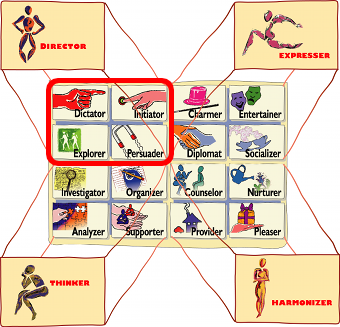
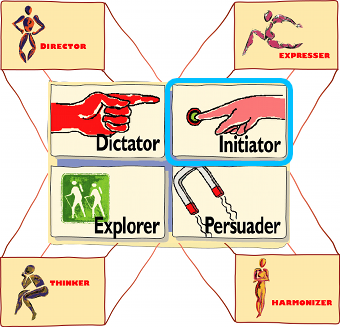
Your secondary communication style determines your style within this quadrant - and your position on the Matrix. For example, if your second highest score is Expresser, your style will be in the upper-right corner of the Director quadrant. This means your specific style is Initiator, as shown here:
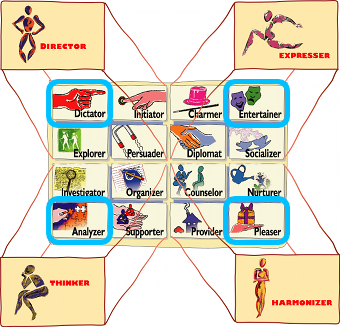
If your highest score is 10 or more points higher than your second highest score, you'll have one of the corner styles on the Matrix. These four unique cases are shown below:
A blended style occurs when your two highest scores are identical. This means you have two primary communication styles and thus two specific styles. You can even be a blend of three or four styles, although this is rare.
Let's look at an example. You get the following scores:
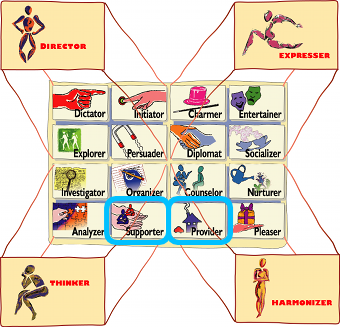
Director - 30 Expresser - 31 Thinker - 36 Harmonizer - 36 Your two primary styles are Thinker and Harmonizer. This means your specific style is both Supporter and Provider (shown below).
-
How is my in-depth profile determined?
The Straight Talk® survey measures your preference for each of the four communication styles: Expresser, Thinker, Harmonizer, and Director. Your total score for each communication style can range from 8 to 40. The higher the number, the more often you display that style of communicating.
Based on your score for each communication style, the system generates an in-depth profile of you. The system can generate more than 1,000 unique profiles.
-
What are Straight Talk® Teams?
Straight Talk® has a feature that enables users to create and manage teams. For team owners, this is a powerful tool to help build teamwork and improve team communication. The people you invite to your team can view their in-depth results and compare styles with anyone on the team. They can also view all their team members' results on their Team Profiles page.
-
How do I invite people to join my team?
Go to your "Manage Teams" page. You can either click "Invite People to Teams" or you can click on the team’s name and then click "Invite people to this team."
Next, enter the email addresses of the people you'd like to invite. You can include a personal message with your invitation. Then, send your message!
Once the recipients have completed the Straight Talk® survey, they will be added to your team. Everyone in the same team can compare styles. However, people in one team cannot see the results of people in your other teams.
-
How many teams can I create?
That depends on which type of account you have. Navigate to your Account page to view the maximum number of teams you are allowed at your tier level and the number of teams you currently have. You can also click on “Manage Account” to view the upgrade options.
-
How do I manage multiple teams?
All your teams are listed on the "Manage Teams" page. Teams that you have created are listed under “Teams I Own” and marked by a yellow star.
To manage a team's settings, click on that team's name. You can then edit the name and description of the team, delete team members, change the team owner, or delete the team.
-
How do I use the Team Profile tab?
Begin by clicking on "Me" in the left-hand menu. You'll see a red icon appear on the Team Profile to the right, indicating your position on the Style Matrix.
You can select an entire team or specific individuals to add to the Team Profile. Each person will appear as a pushpin in the Style Matrix. Clicking on a pushpin will reveal that person’s communication style, their communication scores, and the option to compare styles with that person.
To change views, select either the "Basic" or "Specific" beneath the Team Profile. "Basic" shows the four communication styles, while "Specific" shows the 16 specific styles on the Matrix. "Show names" will reveal the names beneath each pushpin, while "Clear" will erase everyone from the Team Profile. There is also a button to “View Team Scores,” which will reveal the communication style scores and specific styles for each person on a new page. That page can be printed or exported as a CSV file.
-
What is a Team Profile Report?
A Team Profile Report is a PDF report which reveals your team’s positions on the Basic and Specific Style Matrix, as well as tools for managing conflict, understanding the team’s various styles, and improving the team’s communication. The report also includes individual Team Member Profile Reports, which provides an in-depth comparison between each person and each of their other team members.
Clicking the “Team Profile Report” button on the Team Profile tab will send a request to the team at Leading Resources Inc. to provide you with a Team Profile Report.
-
How can I learn more?
One way to learn more is to read the critically acclaimed book, Straight Talk: Turning Communication Upside Down for Strategic Results. The book provides specific techniques and tools - along with dozens of stories and examples - to help people communicate productively.
You can also purchase tools related to Straight Talk® on our online store.
-
Are workshops available?
Yes, and they are a terrific way to build teamwork and communication. You can contact Leading Resources Inc. by calling 1-800-598-7662 or emailing info@gostraighttalk.com for questions or assistance with workshops.
Have a question you’d like to see added to the FAQs? Let us know by contacting us at info@gostraighttalk.com.
